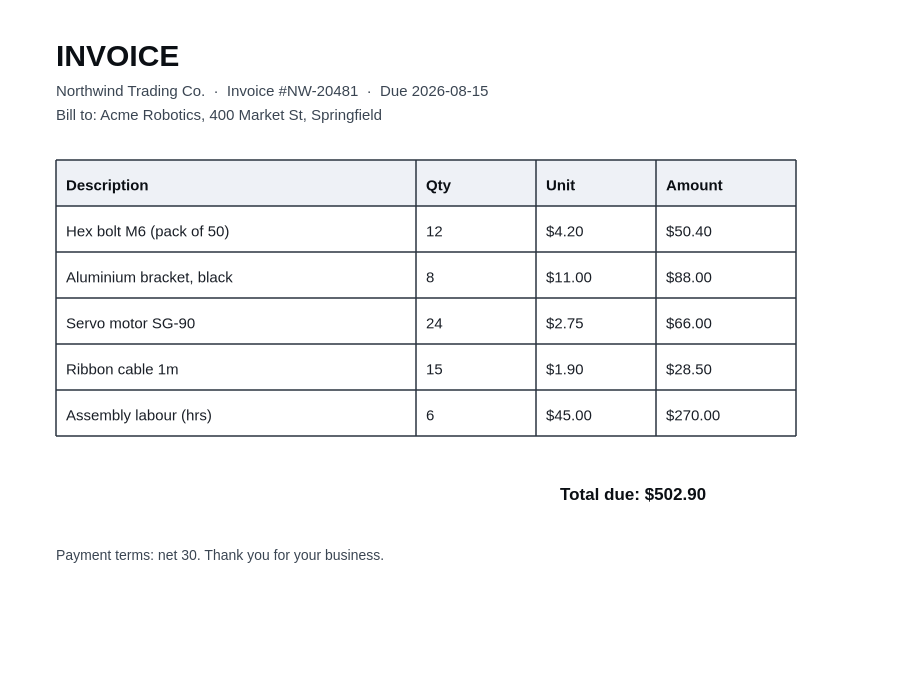
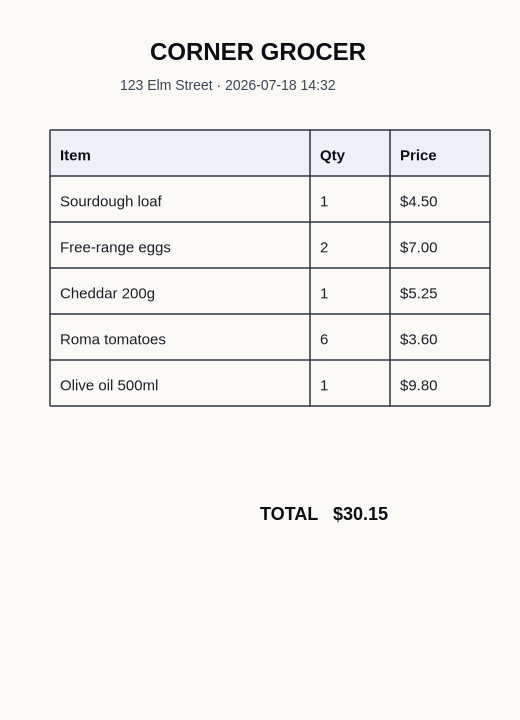
Tap a cell to read it (or use the cell list). Read cells are highlighted.
OCR result for the selected cell:
—
Read a whole row:
Detect a table first.
detect –structure –OCR –grid –
← All models · Table Transformer · TrOCR
use case · multi-model
This is table extraction end-to-end. Table Transformer finds the table and recovers its cell grid; then you tap any cell and TrOCR — a transformer OCR model — reads the text inside it. A picture of a table becomes real, copyable values. Three models, one pipeline, all on your device.
Tap a cell to read it (or use the cell list). Read cells are highlighted.
OCR result for the selected cell:
Read a whole row:
Table Transformer's detection stage gives a table box; its structure stage turns the crop into row and column bands; their intersections are cell rectangles. Each cell rectangle is a tiny single-line image — exactly what TrOCR expects. So the bridge is pure geometry: one model's boxes become another model's input, no shared weights and no retraining. Do this for every cell and you have rebuilt the table as data — a spreadsheet recovered from a screenshot.